How to find every broken pointer in a GEDCOM
A pointer to a record that does not exist is a fatal error, not a warning. Find all of them, then choose delete, repoint or placeholder for each.
Intermediate20 minutesChecked against the tools on 3 Sep 2026Uses GEDCOM Validator, Broken Link Repair and Link Reciprocity Checker
find-every-broken-pointer-in-a-gedcom.md, 8,594 characters. The same bytes answer at /how-to/find-every-broken-pointer-in-a-gedcom.md.
The importer said there is no INDI with that pointer, or it listed a family whose child does not exist, or it stopped without saying anything and half the tree arrived.
A GEDCOM holds its relationships as pointers. A family record says 1 CHIL @I5@ and expects a record starting 0 @I5@ INDI somewhere else in the file. When that record is absent the pointer dangles. The 5.5.5 specification calls this fatal rather than advisory, and a strict importer is entitled to refuse the whole file over one of them.
What causes it
Four ways a pointer loses its target, and they need different repairs.
A record was deleted and the pointers to it were not. The commonest. Delete a person in a program that does not sweep, export, and every family that listed them now points at nothing.
A file was cut. A truncated transfer removes the tail of the file. Every pointer into the missing tail dangles at once, and the count is large.
Letter case. @i5@ and @I5@ are different xrefs. A hand edit or a merge that lower-cased one side produces a pointer that looks right and resolves to nothing.
The link runs one way. @I5@ says FAMC @F1@ and @F1@ never lists @I5@ as a child. Both records exist, so no pointer is broken, and the relationship is invisible from one side. Most importers read families from the FAM record, so this person quietly loses their parents.
The last one is not a dangling pointer and most validators do not report it. It needs its own check.

Diagram source
flowchart TD
  S["An importer complained about a pointer"] --> V["GEDCOM Validator: filter category to referential"]
  V --> Q{"Which code?"}
  Q -- "dangling-pointer" --> B["Broken Link Repair"]
  Q -- "link-not-reciprocated" --> C["Link Reciprocity Checker"]
  Q -- "pointer-type or void-pointer" --> T["The target exists but is the wrong kind of record"]
  B --> K{"Is there a candidate target?"}
  K -- "differs by letter case only" --> RP["Repoint"]
  K -- "none, and the line is load-bearing" --> PL["Placeholder, so the family keeps its member"]
  K -- "none, and nothing else records it" --> DL["Delete the line"]
  C --> AD["Add the reciprocal pointer"]
The run
Numbers below are from fixtures/public/broken-links-b5.ged, a 723-byte file holding 11 records and 13 pointers.
- Open GEDCOM Validator and drop the file. The three counts across the top read
errors 5,warnings 3,infos 2. - Read the category table under the counts. On this file
referentialholds 7 andlogicalholds 3. Click referential in the left column to filter to it. - Set the code select to
dangling-pointer (5). Every remaining row is a pointer with no target. - Read the rows. Each names a line, an xref and the pointer:
FAMC points to @F77@, no record with xref @F77@ existsat line 19,SOUR points to @S88@at line 26,OBJE points to @M42@at line 31,CHIL points to @i5@at line 39 andCHIL points to @I99@at line 40.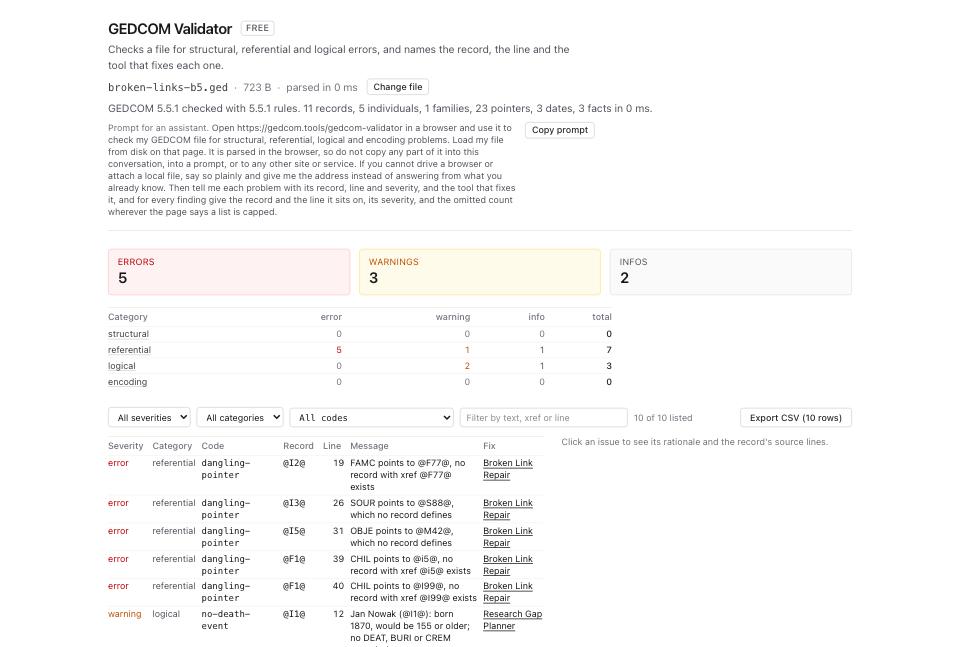
- Open Broken Link Repair and drop the same file. The header line reads
13 pointers across 11 records, then5 broken pointersand3 orphaned records. - Read the Broken links list. Each card names the record and pointer, a
no such recordbadge, the confidence and the line, its recommendation on the right, and a Repair select that starts atleave as is. - Read the card for line 39,
CHIL @i5@. As loaded it saysrecommended: repointand three rationale lines, the first@F1@ line 39 points at @i5@; no record defines that xref. Set its Repair select toRepoint @F1@ line 39 from @i5@ to @I5@ (recommended). The card then adds the diff,- 1 CHIL @i5@above+ 1 CHIL @I5@, two more rationale lines,@I5@ differs from @i5@ in letter case onlyand@I5@ is an INDI record, which is what CHIL names, andRepair confidence 90%. That is the case fault, found and fixed without you noticing the capital. - Read the card for line 40,
CHIL @I99@. No candidate exists, and aload bearingbadge sits beside the line number because@F1@ is a family record and CHIL is part of its shape; deleting the line drops a member of the family. Its recommendation readsrecommended: placeholder, offered at 0.70 against delete at 0.60. Take the placeholder when you know a child existed and the record is gone.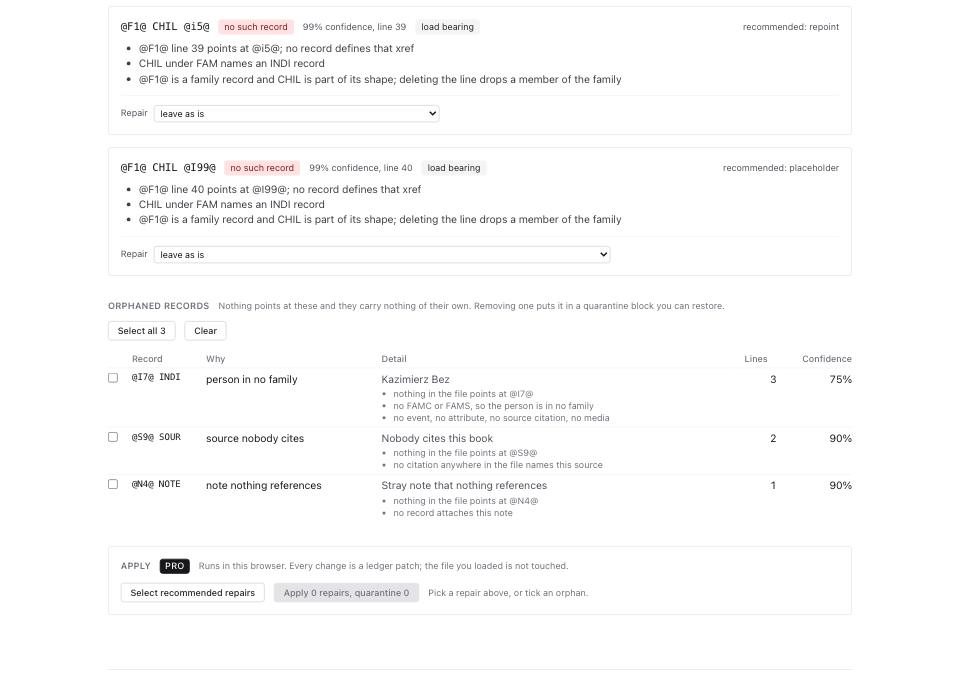
- Press Select recommended repairs to take every recommendation at once, or set each Repair select yourself. The primary button then reads Apply 5 repairs, quarantine 0.
- Read Orphaned records below. On this file it lists 3, with Select all 3 and Clear above them:
@I7@ INDIasperson in no familyat 75%,@S9@ SOURassource nobody citesat 90%, and@N4@ NOTEasnote nothing referencesat 90%. Nothing points at them. Ticking one and applying puts it in a quarantine block inside the exported file, which the same tool restores with Restore quarantined records. - Open Link Reciprocity Checker and drop the file. The header line reads
10 pointers checked across 5 individuals and 1 families, then4 one-way pointers, and the badges below read3 orphaned pointerand1 incomplete entry. - Read the
incomplete-entryfinding:@I5@ has FAMC @F1@ but @F1@ lists 3 CHIL, none of them @I5@, at 0.80. Both records exist, so no validator error fired, and@I5@has no parents from the family's side. Its Repair select starts atleave as is; choose the add option, then press Apply 1 fix and build file under Fix.
What to check when it worked
- GEDCOM Validator on the repaired file reports 0 rows under code
dangling-pointer. - Broken Link Repair reports
Every pointer names a record that exists.in its header line. - Link Reciprocity Checker reports 0 for
incomplete-entry, or every remaining one is a deliberate one-way link. - The person counts did not fall. A repair that deletes a load-bearing
CHILline removes a child from a family, and the family is smaller by one. - The importer that refused the file accepts it.
What to do when it did not
The dangling count is in the hundreds and they share a prefix. The file was cut. Every pointer into the missing tail dangles at once. Run File Inspector and compare Records by type against what you expect; then GEDCOM error messages, decoded covers the truncation case.
A pointer resolves but the validator still complains. Read the code. pointer-type means the target exists and is the wrong kind of record, such as a CHIL naming a SOUR. void-pointer means the file wrote @VOID@ on purpose, which 7.0 allows and 5.5.1 does not.
Repointing produced a person in two families. The candidate matched on letter case and the two records were genuinely different people. Reload the page to start from the file as it came in, and choose the placeholder instead.
You are on GEDCOM 7.0 and want a conformance check, not a pointer check. The specification authors publish their own browser-local checker at gedcom7code.github.io/js-gedcom. Use it for 7.0 conformance and this page for the pointer graph.