GEDCOM error messages, decoded
One row per refusal message. What the bytes look like behind each one, which tool names it, and the repair. Nine messages, nine causes.
Beginner15 minutesChecked against the tools on 3 Sep 2026Uses File Inspector, Corrupted File Recovery and GEDCOM Validator
decode-gedcom-error-messages.md, 8,871 characters. The same bytes answer at /how-to/decode-gedcom-error-messages.md.
An upload failed and the site gave you a sentence. Invalid GEDCOM file. Unable to import GEDCOM. Error 20. The sentence names no line, no record and no byte. Search it and you get forum threads where five people guess.
The message is not useless. Each one is emitted at a different point in the reading of the file, and the point tells you which of six byte-level faults you have.
What causes it, message by message
Read down the first column until you find your sentence. The second column is what a text editor would show. The third is the code this site's File Inspector prints for it.
| The message you got | What the bytes are doing | Inspector or Validator code |
|---|---|---|
| Invalid GEDCOM file. No header record found | The first line is not 0 HEAD. Usually a file joined from two exports, or a header cut off in transfer | missing-head, error |
| Unable to import GEDCOM | Nothing narrower is offered, so start at the top of the Problems table. In our runs the top cause is a file that ends mid-record | missing-trlr, warning |
| Line 1: header error | Byte order mark, or 1 CHAR UTF-8 in a file the importer wants as ANSEL. The importer read byte 1 and stopped | charset-mismatch, info |
| GEDCOM file is not valid | A line that does not begin with a level number. One line stops a strict reader at that line | malformed-line, error |
| Error 20, invalid GEDCOM format | A level number that cannot follow the one above it, such as a 9 under a 2 | level-jump, error |
| Some of the data in this GEDCOM file was not uploaded correctly | The file parsed. The importer dropped tags it does not map. Nothing is broken in the file | no parser code; see the Dialect Report |
| The file contains no individuals | Records exist but the parse stopped before them, or every 0 @I1@ INDI line is malformed | INDI count of 0 in Records by type |
| Duplicate ID / record already exists | Two records declare the same xref. Two trees pasted together | duplicate-xref, error |
| Names contain question marks or boxes after import | The file parsed. The charset the header declares is not the charset the bytes are | invalid-utf8, error, or charset-mismatch |
Two of those rows are not faults in your file. Some of the data ... was not uploaded correctly and the question marks are both the importer telling you about itself. The first is a mapping decision on their side, covered in which of your custom tags each site will delete. The second is a charset decision, covered in how to fix garbled characters and accents.
The missing trailer is the one fault with a published fix elsewhere, and GEDminer's recovery guide states it correctly: a file with no 0 TRLR is the most common "will not open". That page performs the repair in a text editor. This one names the code and repairs it in the browser.
Which tool reads which message

Diagram source
flowchart TD
  M["You have a refusal message"] --> I["File Inspector: drop the file"]
  I --> P{"What does Problems list?"}
  P -- "missing-head, level-jump, malformed-line, duplicate-xref, missing-trlr" --> R["Corrupted File Recovery"]
  P -- "invalid-utf8, charset-mismatch, undefined-ansel-byte" --> E["Encoding Repair"]
  P -- "nothing, and the counts look right" --> V["GEDCOM Validator: the fault is in what the file asserts"]
  R --> RV["Validate the recovered file"]
  E --> RV
  V --> D["Fix the records the Validator names"]
The fix
- Open File Inspector and drop the file on the drop target. Parsing runs in your browser; nothing is uploaded.
- Read Header. It states the GEDCOM version, the producer, the declared charset, what it was decoded as and the line endings. On
broken-structure-synthetic.gedthe version reads5.5.1, the producer readsGEDTK-TEST (GED Toolkit synthetic fixture)and line endings readLF. - Read Records by type. On the same file it lists
INDI 2,FAM 1,HEAD 1. A count of 0 forINDIon a file you know holds thousands means the parse stopped early. - Read the Problems table. Its four columns are Line, Severity, Code and Message. On this file the section title reads
Problems: 1 errors, 1 warnings, 0 infoand it holds two rows: line 15,error,level-jump,Level jumps from 2 to 9; andnot recorded,warning,missing-trlr,File has no 0 TRLR record.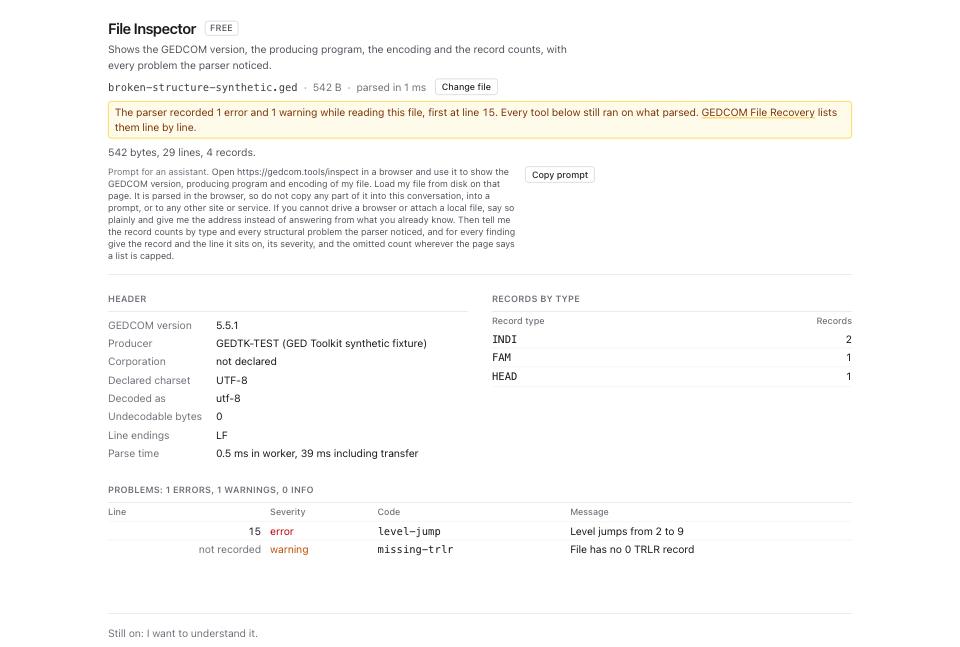
- Match the code to the third column of the table above. That is the byte-level fault behind your message.
- For any code in the first branch of the diagram, open Corrupted File Recovery and drop the same file.
- Read Byte accounting first. On this file it reads
542 kept + 0 dropped = 542; input 542. Every input byte is accounted for.The line below adds that 70 of the kept bytes sit in rewritten lines and the output is 541 bytes. - Read Records. The columns are Type, Input, Recovered. On this file
TRLRgoes from 0 to 1, because the trailer was synthesised, andINDIholds at 2. - Read Changes and findings: 3. Two are tagged
rewrittenand onesynthesized:Line 15: level 9 after a level 2 line; re-levelled to 3 under PLACat 60% confidence,8 line terminators rewritten to LFat 90%, and0 TRLR appendedat 95%. A confidence under 100% is the tool telling you it guessed.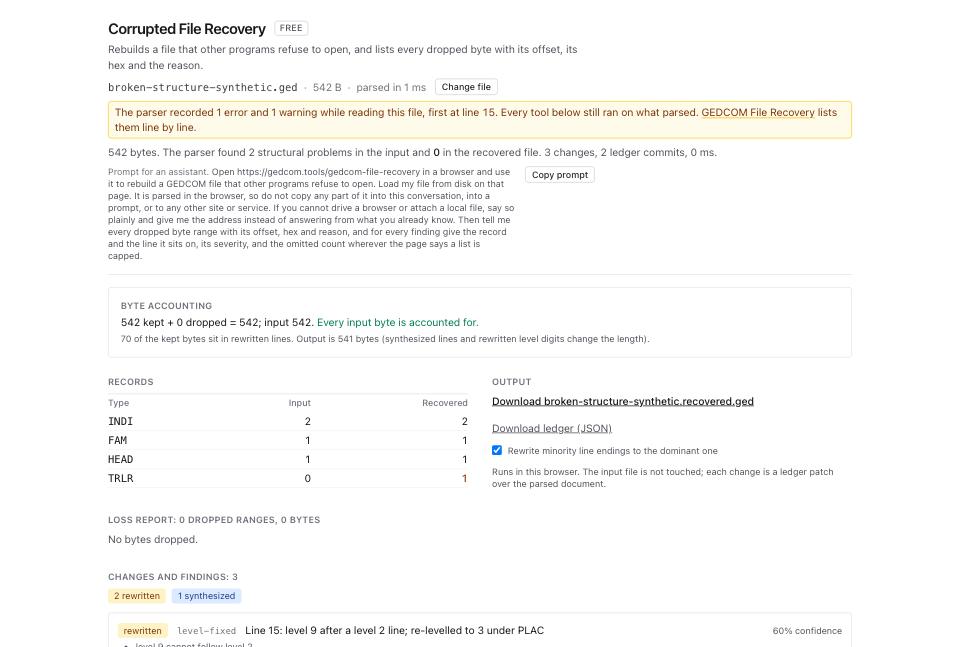
- Click the download link under Output, which is named after your file. On this fixture it reads Download broken-structure-synthetic.recovered.ged.
- Open GEDCOM Validator and drop the recovered file. Read the three severity counts across the top: errors, warnings, infos.
What to check when it worked
- File Inspector on the recovered file lists no row of severity
errorunder Problems. - The Records table in Corrupted File Recovery shows the same
INDIandFAMcounts in the Input and Recovered columns. Onbroken-structure-synthetic.gedthat is 2 and 1. - Byte accounting ends with
Every input byte is accounted for. - GEDCOM Validator reports 0 errors. Warnings and infos describe the content of the tree, not whether a program can read it.
- The site that refused the file accepts it. If the message changes rather than disappearing, you had two faults; run the loop again on the new message.
What to do when it did not
The message stayed the same and the Inspector found nothing. The fault is in what the file asserts, not in how it is written. Run GEDCOM Validator and set the category filter to referential. A pointer to a record that does not exist reads as a broken file to a strict importer. How to find every broken pointer in a GEDCOM walks that.
The message changed to one about data, not about the file. The file now parses and the destination is refusing content. Run Dialect Report and read the card for your destination.
Records are missing from the Recovered column. Those bytes were gone before the file reached you. Read Loss report: each dropped range carries an offset, a length, the line it sat on and its first 16 bytes as hex. Ask whoever sent the file for a fresh export.
The recovery changed something you disagree with. Every change is a ledger patch. Click Download ledger (JSON) and read the ops. Your input file is never written to.