How to / Sources and next research steps
How to plan your next genealogy research steps
Find gaps in your GEDCOM, review archive suggestions, and save a research plan. Use optional AI ordering without treating suggestions as evidence.
Intermediate20 minutesChecked against the tools on 6 Sep 2026Uses Research Gap Planner, Note Structurer and Citation Parser
plan-your-next-genealogy-research-steps.md, 6,958 characters. The same bytes answer at /how-to/plan-your-next-genealogy-research-steps.md.
Choose a question you can answer with a record: who a person's parents were, where a marriage took place, or which source supports a birth date. Research Gap Planner scans your GEDCOM for missing relationships, events and citations, then suggests places to search from its source directory. You can download that plan without using AI.
Why a gap needs review
An absent citation means the GEDCOM does not cite a source there. You may already hold the source in a notebook, another program, or a media folder. A missing marriage event does not prove that a couple married, and an uncited death does not establish that a death record survives.
Priority measures the gap's place in this file: descendants, a blocked ancestral branch, and available place or date clues contribute to the score. Confidence and priority do not measure the probability that an archive holds the answer.

Diagram source
flowchart TD
  A["Load a GEDCOM"] --> B["Review the local gap list"]
  B --> C["Check the person, place and years"]
  C --> D["Choose an archive and inspect its coverage"]
  D --> E["Search the records yourself"]
  E --> F{"Did you find relevant evidence?"}
  F -- "yes" --> G["Record the citation and assess the claim"]
  F -- "no" --> H["Record the search scope and remaining limits"]
The steps
- Open Research Gap Planner and choose your GEDCOM. Wait for the gap count and source-directory version. The initial plan runs in your browser.
- Use Filter by kind to focus on one task, such as unknown parents or an uncited birth. Open Why this gap, and why here on a finding to read its signals and ranking. Follow the record and line back to your data before starting a search.
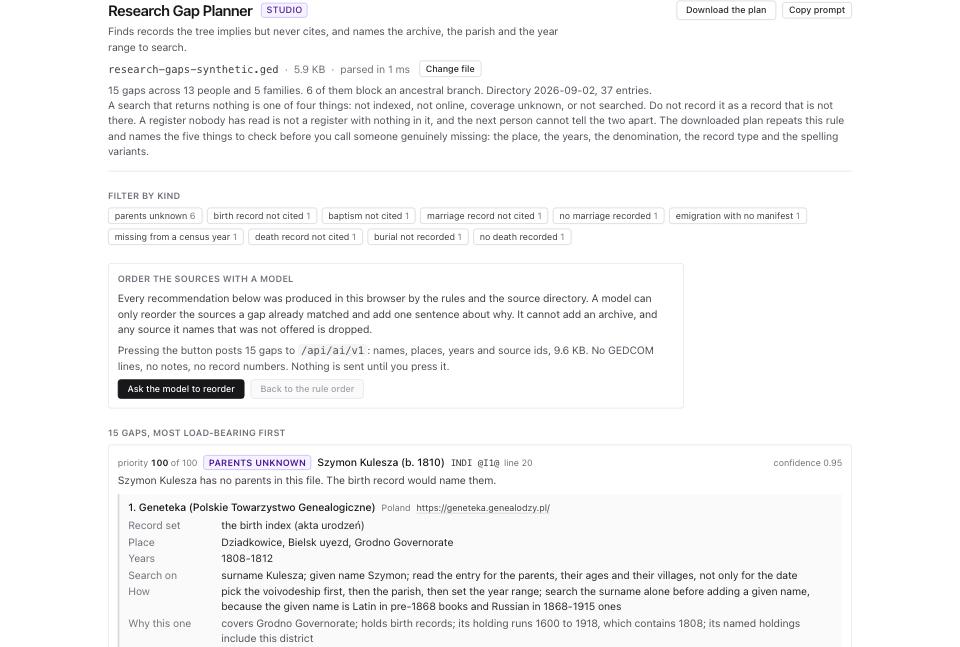
- For a suggested source, review Record set, Place, Years, Search on, How and Why this one. Pay attention to places inferred from relatives or from the rest of the file. Confirm the jurisdiction and denomination yourself.
- Expand Source directory to inspect coverage, access requirements and checked dates. Follow the source link to its own site when you are ready to search. Opening an archive leaves GEDCOM Tools; that site has its own privacy and access rules.
- Click Download the plan. You receive a Markdown file ending in
-research-plan.md, not a modified GEDCOM or an HTML report. The download includes the detected plan even if you filtered the visible cards. Store it with your research notes; it contains names and other tree details. - Search one record set and log the result. Record the site or archive, collection, place, years, denomination, spelling variants, search date and result. Save the image reference or page number for a useful record. Read the original record where available before accepting an indexed transcription.
- Add supported facts and citations in your genealogy program, export a new GEDCOM, and run the planner again. Use Citation Parser for supported archive identifiers already in free-text citations. Use Note Structurer to review hypotheses and negative findings in existing notes.
Optional: ask a model to reorder sources
Ask the model to reorder sends the disclosed names, places, years and source IDs for up to 25 eligible gaps through the GEDCOM Tools server to the model provider. The request excludes raw GEDCOM lines, NOTE fields and separate structured record numbers; copied descriptions can still contain identifiers or other private details. Names and places can still identify living relatives, so use a redacted working copy or stay with the local plan when that disclosure is unsuitable.
The server requires model access and enforces usage limits. Follow the access instructions if the request asks you to unlock it. An unavailable model does not prevent downloading the rule-based plan.
The model can reorder sources already offered for a gap and add a short reason. It cannot add an archive, search its holdings, fetch a record or add an ancestor to your tree. Click Back to the rule order to restore the local ordering; that does not retract data from a request you already sent.
What to check when it worked
- Each task you choose identifies a person or family, a question, and a place or period worth investigating.
- You have checked the archive's coverage and access conditions, including books that lack an online index.
- You can distinguish a suggested source from a record you have inspected and cited.
- Your original GEDCOM remains unchanged. The planner downloads research instructions and makes no tree edits.
What to do when it did not
No archive suggestion. Add a supported country or historical jurisdiction to your working copy after verifying the place. A bare village name may not match the built-in place table. Search the archive catalogue yourself if the directory does not cover the area.
No gaps found. Check that you loaded the intended file. The detector covers specific gap types; it cannot certify that your genealogy is complete or that its citations prove the claims.
The list stops early. Use Show 50 more to reveal additional detected gaps. The detector stops at 500 gaps per file and reports how many further gaps it did not rank. The download cannot recover those omitted gaps. Work with a smaller branch if you need a more focused pass.
An online search finds nothing. Record whether you checked an index, browsed images, or contacted the archive. Distinguish not indexed, not online, coverage unknown and not searched. Treat a negative finding as evidence only within the place, years, denomination, record type and spelling variants you checked.
The AI request fails or reaches a limit. Keep the local plan and download it. Stop repeated requests after a quota or rate-limit message; more attempts will not expand the directory or its coverage.