How to prepare a GEDCOM for GEDmatch
Every GEDmatch tree is public. Redact the living, cut the branch you mean to share, and check the file for addresses left in free text.
Intermediate25 minutesChecked against the tools on 3 Sep 2026Uses Living Person Privatiser, Subtree Extractor and Dialect Report
prepare-a-gedcom-for-gedmatch.md, 8,347 characters. The same bytes answer at /how-to/prepare-a-gedcom-for-gedmatch.md.
GEDmatch trees are public. Not private-by-default, not visible to matches only. Anyone with an account reads the names, dates, places and relationships in the file you upload.
The best answer currently on the first page of results for this is to open the file and rename every living person to "Private" by hand. On a 20-person tree that is twenty edits. On a 4,000-person tree it is a weekend, and the names are only the first of four places a living person leaks.
What causes the exposure
GEDmatch marks people it believes are living as LIVING and hides their details. Two things make that unreliable as your only protection.
The rule it uses is a guess from the file. A person with a birth date and no death record is treated as possibly living. A person with neither is a coin toss. The GEDmatch forums carry threads from people whose living relatives showed in full because a birth year was missing, and threads from people whose dead ancestors were hidden because a death date was.
The second is that a name is not the only identifier. A phone number in a NOTE, a street address under RESI, an email in a source citation and a file path holding a person's name in an OBJE line all survive the name being replaced. Nothing on the GEDmatch side reads those fields for you.
Two decisions come before the upload: who counts as living, and how much of the tree GEDmatch needs at all. GEDmatch matches DNA to a lineage. A branch is usually enough, and a branch you cut yourself carries a fraction of the exposure.

Diagram source
flowchart TD
  S["A tree you want on GEDmatch"] --> D{"Does GEDmatch need the whole tree?"}
  D -- "no, one line of descent" --> X["Subtree Extractor: cut the branch first"]
  D -- "yes" --> P["Living Person Privatiser"]
  X --> P
  P --> C{"Read Identifiers in free text"}
  C -- "rows listed" --> F["Turn on the free-text scan and rebuild"]
  C -- "none" --> B["Build the privatised file"]
  F --> B
  B --> R["Dialect Report: read the GEDmatch card before uploading"]
The run
Numbers below are from fixtures/public/Musterstammbaum.ged, a 20-person Ahnenblatt export.
- Open Subtree Extractor and drop the file. The header line reads
20 people in 34 records. - Under Root person, use the Person select to pick whoever the DNA test belongs to. On this fixture that is
@1@ Max Mustermann, b. 1 JAN 1980. The Search box beside it filters by name, xref or year. - Under Walk, set Direction to
Ancestors and descendants, Generations up to 2 and Generations down to 0. That gives the ancestry GEDmatch matches against, without the living descendants. - Read These settings include. With those settings the fixture reports
13 records of 34,7 people,3 families,1 sources, notes, mediaand3.1 K characters, then1 root 6 ancestorsbelow. That is 7 of 20 people leaving your machine instead of 20. - Read Dropped so nothing points outside. It reads
3 to FAM records, and the table names them:FAMS @F10@at line 30,FAMS @F7@at line 80 andFAMC @F4@at line 109, eachFAM record left out by these settings. The extract holds no pointer to a record it does not carry. - Press the primary button, which reads Extract 13 records with those settings, and keep the file.
- Open Living Person Privatiser and drop your file. The header line states the split. On the full fixture it reads
20 people. 11 are treated as living and will be redacted; 9 are dead, withCutoff year 1926. - Read How each verdict was reached. On this fixture 8 people were decided by a death record and 12 by the birth cutoff. A file where a large share sits under
nothing to go on, treated as livingis a file whose dates are thin, and the redaction will be broad.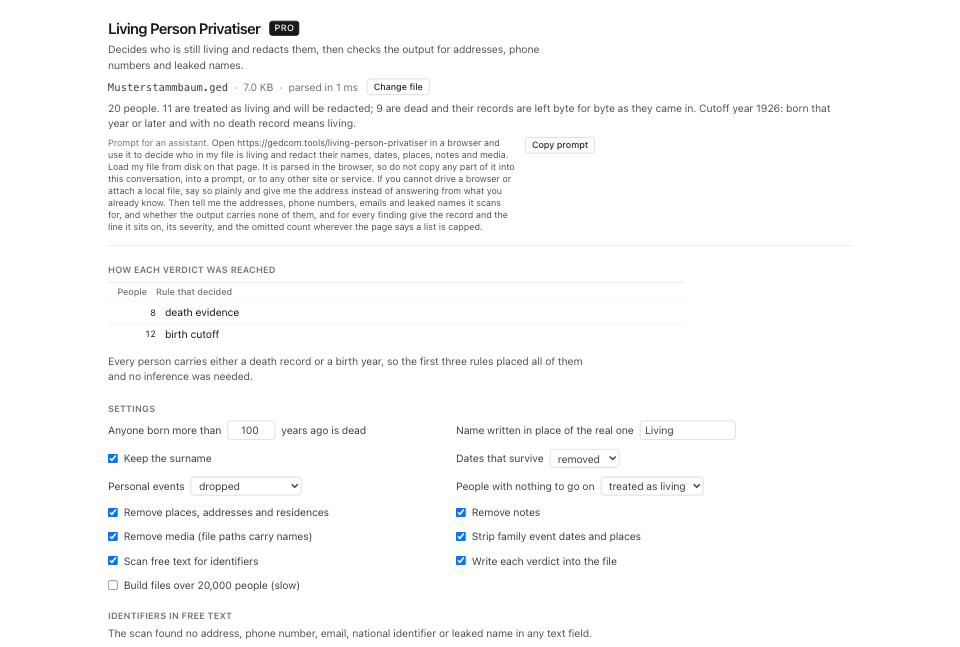
- In Settings, leave Scan free text for identifiers ticked. Untick Keep the surname if the surname alone identifies the family in a small place.
- Read Identifiers in free text. On this fixture the scan finds none. On
fixtures/public/TGC551.gedthe same scan finds 26 across the header and the records: 2 street addresses, 10 phone numbers, 6 emails, 2 national identifiers and 6 leaked names. The line above the table states how many sit outside the records being redacted, which is the number field-level redaction would leave behind. - Press Build the privatised file, then use the download link. Press Download classification CSV as well if you want the per-person verdict as a spreadsheet.
- Open Dialect Report and drop the privatised file. Read the GEDmatch card under Destination compatibility.
- Check the
gedmatch.auto-livingline. On the unprivatised fixture it reads12 people have a birth date and no death record; GEDmatch may replace their name and dates with LIVING. On the privatised file that count should fall, because those people no longer carry a bare birth date.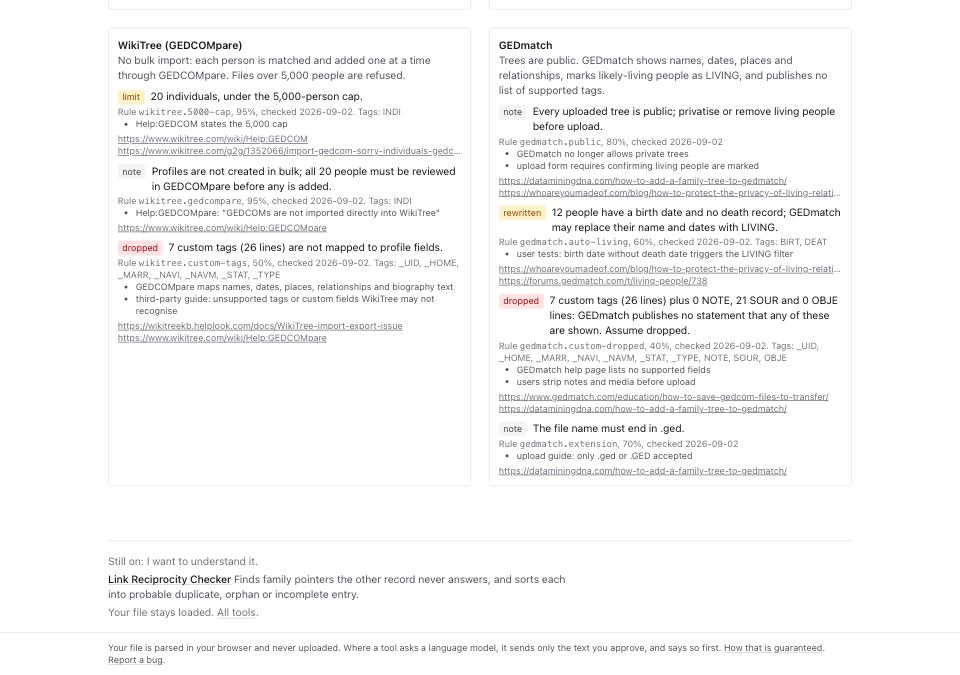
- Read
gedmatch.extension: the file name must end in.ged.
What to check when it worked
- The privatised file, opened in GEDCOM Viewer, shows no given name for anyone you meant to redact. Search the surname of a living relative and read the row.
- Identifiers in free text on the privatised file reports no address, phone number, email, national identifier or leaked name.
- The GEDmatch card's
gedmatch.custom-droppedcount tells you what will not be shown at all. On the fixture that is 7 custom tags across 26 lines plus 21 SOUR lines. - The subtree file holds only the people you chose. Its These settings include count is the number of people GEDmatch will publish.
- The file name ends
.ged.
What to do when it did not
Someone living was left in the clear. They had no birth date and no death record, so nothing placed them. Set People with nothing to go on to treated as living and rebuild. The person table's unknown filter lists exactly who that affects.
Someone long dead was redacted. Their death is recorded as DEAT Y with no date, which the cutoff cannot use. Add a death year to the record and run again. The GEDmatch card carries a matching warning, gedmatch.deat-y, on files that hold those records.
The privatised file is larger than the original. Redaction writes a determination on each record saying which rule fired, so the decision travels with the file instead of living in this browser. Untick Write each verdict into the file if you would rather not carry it.
You want the full tree on GEDmatch anyway. Then read the whole GEDmatch card, not the auto-living line alone. It publishes no list of supported tags, so which of your custom tags each site will delete treats every extension tag as dropped.