Which of your custom tags each site will delete
Six destinations, one instrumented file, one table. Which underscore tags survive, which become notes, and which are gone with no message.
Intermediate20 minutesChecked against the tools on 3 Sep 2026Uses Dialect Report and File Inspector
what-each-site-deletes-from-your-gedcom.md, 9,837 characters. The same bytes answer at /how-to/what-each-site-deletes-from-your-gedcom.md.
You are about to move a tree. The question is not whether the people arrive. They will. The question is whether the source links, the media metadata and the relationship qualifiers arrive with them, and no destination publishes that list.
FamilySearch comes closest. Its help centre page on what happens to information uploaded from a GEDCOM file says the sources, notes and media in a GEDCOM cannot be transferred to Family Tree, which is honest and states a category. It names no tag, and it is the platform's own statement about the platform, so read it first and read the tag counts below it. MyHeritage publishes a page about photos. Ancestry publishes nothing found in a September 2026 search. The two independent references the experts cite for this, gedcomassessment.com and genealogytools.com, both fail DNS.
So the tags have to be counted in the file, and the destination rules read off a knowledge base with a date on every line.
What causes it
A GEDCOM tag beginning with an underscore is not in the specification. Every program is free to invent them and every program does. An importer that meets _APID has three options: map it to something of its own, keep it as text, or drop it. Only the first keeps the meaning, and only the exporting program knows what the meaning was.
Two tags carry most of the value in a moved tree.
_APID sits under a source citation in an Ancestry export. Its value looks like 1,60525::120334455: a database id and a record id inside Ancestry's own collections. It is the link from your citation to the scanned page. Ancestry re-links it on upload. RootsMagic ignores it. Gedcom Publisher maps it to a RecordID.
_UID is a per-record identifier that lets two programs recognise the same person after a round trip. Ancestry imports _UID and exports it as UID with no underscore, cut to 32 hex digits. RootsMagic reads a 36-character PAF-style value and rejects a bare UID as unknown. Family Historian writes it wrapped in braces.
The rest of an export's underscore tags are photo crop boxes, tree ids, server environment names and to-do flags. Losing them costs nothing. Losing _APID costs every link back to a record image.

Diagram source
flowchart TD
  E["Your export"] --> T{"Is the tag in the specification?"}
  T -- "yes: INDI, FAM, NAME, DATE" --> K["Arrives at every destination"]
  T -- "yes, but attached: SOUR, NOTE, OBJE" --> A{"Read the destination card"}
  T -- "no, underscore tag" --> U{"Whose tag is it?"}
  U -- "the destination's own, going home" --> H["Re-linked. Only _APID into Ancestry"]
  U -- "any other program's" --> X["Dropped, or turned into note text"]
  A -- "FamilySearch" --> X
  A -- "Ancestry" --> M["Notes and sources arrive, media does not"]
  A -- "GEDmatch" --> X
What the six destinations do
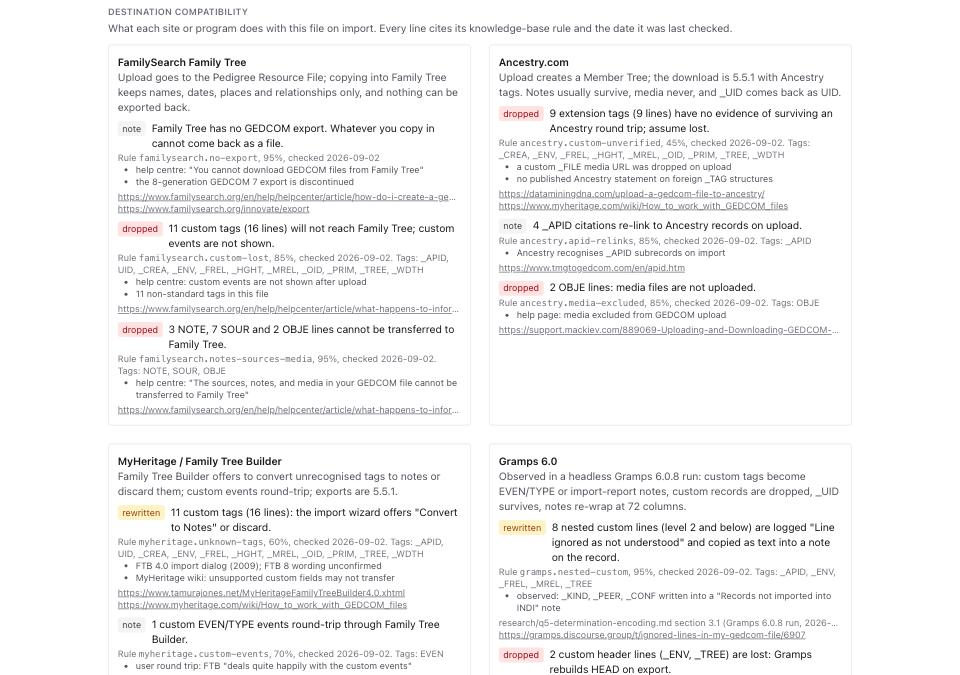
Numbers below come from one run of Dialect Report on fixtures/public/ancestry-export-synthetic.ged, a 1,849-byte Ancestry-shaped file holding 3 people, 11 distinct custom tags across 16 lines, 3 NOTE, 7 SOUR and 2 OBJE lines. Reproduce them by dropping that file on Dialect Report.
| Destination | Custom tags | Notes, sources, media | The rule that fired |
|---|---|---|---|
| FamilySearch Family Tree | 11 tags, 16 lines dropped | 3 NOTE, 7 SOUR, 2 OBJE dropped | familysearch.custom-lost, familysearch.notes-sources-media |
| Ancestry.com | 9 tags, 9 lines assumed lost. 4 _APID re-link | 2 OBJE dropped, media files not uploaded | ancestry.custom-unverified, ancestry.apid-relinks, ancestry.media-excluded |
| MyHeritage | 11 tags, 16 lines: the wizard offers Convert to Notes or discard | 1 custom EVEN/TYPE event round-trips | myheritage.unknown-tags, myheritage.custom-events |
| Gramps 6.0 | 8 nested lines become text in a note; 2 header lines (_ENV, _TREE) dropped | 3 NOTE lines re-wrapped with CONC at 72 columns | gramps.nested-custom, gramps.head-custom, gramps.notes-rewrap |
| WikiTree | 11 tags, 16 lines not mapped to profile fields | reviewed one profile at a time in GEDCOMpare | wikitree.custom-tags, wikitree.gedcompare |
| GEDmatch | 11 tags, 16 lines plus all 12 NOTE, SOUR and OBJE lines: assume dropped | no statement published, so assume dropped | gedmatch.custom-dropped, gedmatch.public |
One row in that table is different from the other five. Ancestry is the only destination that does anything with _APID other than drop it, and only because _APID is Ancestry's own tag going home. Move the same file to any of the other five and those four citation links become nothing. No message is shown.
Read the whole card, not the tag column. familysearch.no-export says Family Tree has no GEDCOM export at all, so a tree copied in cannot come back out as a file, and gedmatch.public says every uploaded tree is public.
For the one program with a maintained per-tag reference, use the reference. The Family Historian GEDCOM Extension List at fhug.org.uk documents every _ tag Family Historian writes and says for each whether other software ignores it. Nothing written here improves on that for that program.
The run
- Open File Inspector and drop your file. Read Header to confirm the producing program. A file that says
Ancestry.com Family Treesunder Source will carry_APID; one that saysMyHeritagewill carry_UIDas 32 hex digits. - Open Dialect Report and drop the same file. The header line states the knowledge base version,
2026-09-02at the time of writing. - Read Producer. On the fixture it reads
Ancestry.com Member Trees (98%), with the rationale listingHEAD.SOUR Ancestry.com Family Trees (Ancestry.com Member Trees) matches "ancestry"andsignature tags present: _APID, _TREE, _ENV. - Read File facts on the right. Custom tags reads
11 distinct, 16 lineson the fixture. - Read Custom tag inventory. One row per tag, with Kind, Count, First at, Carried by, Under and Sample values.
_APIDreadsextension, count 4, carried byINDI 3, FAM 1, underINDI.SOUR, FAM.SOUR.UIDreadsnot in spec, count 3, carried byINDI 3, underINDI.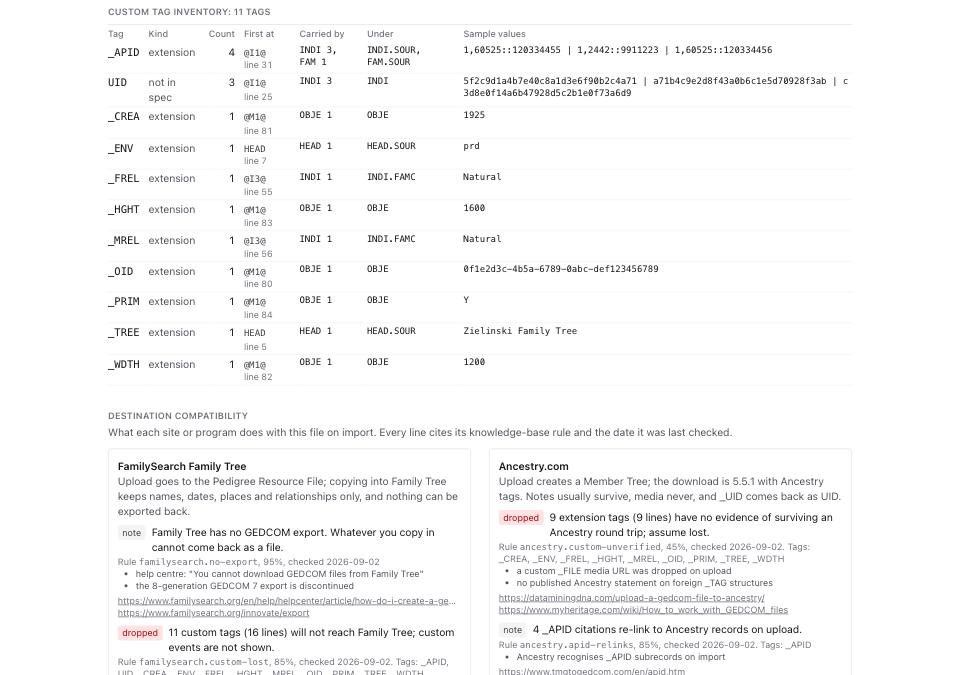
- Scroll to Destination compatibility. Six cards, one per destination. Each warning carries a badge reading
dropped,rewritten,limitornote, a rule id, a confidence and a checked date. - Read the card for the site you are moving to. Copy the rule id if you want to cite it later; every rule links its own sources.
- Decide before uploading. If a card says a tag family is dropped and that family holds your citation links, export a second copy of the tree and keep it. There is no way to get the tags back from the destination.
What to check when it worked
- Producer names the program you exported from, at 90% or better. A lower number means the header was rebuilt by something in between, and the tag predictions are weaker.
- Custom tag inventory row count equals the Custom tags figure in File facts. On the fixture both read 11.
- Every warning on the destination card carries a rule id and a checked date. A line with no date is not a claim this site makes.
- The counts add up. On the fixture the GEDmatch card's
gedmatch.custom-droppedline reads11 custom tags (16 lines) plus 3 NOTE, 7 SOUR and 2 OBJE lines, and that 11 and 16 are the pair File facts states.
What to do when it did not
Producer reads unknown. The file has no HEAD.SOUR this knowledge base recognises and no signature tags. The destination cards still apply, because they key off tags rather than producers, but the producer quirks section will be empty.
A tag you care about is not in the inventory. The inventory lists tags outside the specification. A standard tag such as SOUR or OBJE is counted in File facts instead, and its fate is on the destination cards under notes, sources and media.
The destination you want is not one of the six. No card, no claim. Read the Custom tag inventory and treat every extension tag as lost, which is what five of the six do.
You want the tags back after the move. They do not come back. FamilySearch has no GEDCOM export. Ancestry exports 5.5.1 with its own tags, not yours. Keep the original file.