What is ANSEL, and why your names look wrong
Your file says 1 CHAR ANSEL and the accents came out as separate marks. ANSEL puts the accent before the letter, and Unicode puts it after.
Intermediate15 minutesChecked against the tools on 3 Sep 2026Uses Encoding Repair and File Inspector
what-is-ansel-and-why-your-names-look-wrong.md, 9,174 characters. The same bytes answer at /how-to/what-is-ansel-and-why-your-names-look-wrong.md.
Your file's header carries the line 1 CHAR ANSEL. Somewhere a name that should read Zoë reads Zoèe, or Müller reads Mèuller, or every accented letter has turned into a letter followed by a stray mark.
ANSEL is a character set from 1985. It is the one GEDCOM 5.5 mandates, and it is the reason a name written correctly forty years ago is unreadable today.
The pages that come up when you search for it are a Haskell library, a mirror of the specification, a university page from the 1990s and an archiveteam entry. All accurate, none written for someone looking at a wrong name.
What causes the mangling
ANSEL is ANSI Z39.47, built for American library catalogue cards. It holds 8-bit values: the first 128 are plain ASCII, and the rest are letters and marks a librarian needed for European and transliterated names.
The part that surprises people is where the accent goes.
In ANSEL a diacritic is its own byte, and that byte comes before the letter it sits on. ë is two bytes: E8 for the umlaut, then 65 for the letter e. In Unicode the same combination is written the other way round: U+0065 for the e, then U+0308 for the combining umlaut. Mark first in ANSEL, letter first in Unicode.
That single reversal produces most of the damage, and it explains the exact shape of the mangling:
| Written in ANSEL as | Bytes | Read as ANSEL | Read as Windows-1252 |
|---|---|---|---|
Zoë | 5A 6F E8 65 | Zoë | Zoèe |
Müller | 4D E8 75 6C 6C 65 72 | Müller | Mèuller |
À | E1 41 | À | áA |
å | EA 61 | å | êa |
Read the third column against the fourth. A program that ignores 1 CHAR ANSEL and assumes Windows-1252 turns the accent byte into a letter of its own, and leaves the base letter standing beside it. The wrong output is not random. It is always one extra accented character sitting in front of the letter that should have carried the accent.
Two more ANSEL facts worth knowing before repairing anything.
Some ANSEL bytes are complete letters, not marks. A2 is Ø and B2 is ø; A5 is Æ and B9 is £. Read as Windows-1252 those four become ¢, ², ¥ and ¹: one wrong character rather than a pair, so a name with an Ø in it looks less broken and is just as wrong.
And GEDCOM's ANSEL is not quite the library's ANSEL. The 5.5.1 appendix adds five values at BE, BF, CD, CE and CF that ANSI Z39.47 does not define. A general-purpose ANSEL decoder gets those wrong.

Diagram source
flowchart TD
  H["Header says 1 CHAR ANSEL"] --> R["Encoding Repair: read the verdict block"]
  R --> Q{"HEAD.CHAR says versus Bytes are"}
  Q -- "both ANSEL" --> T["Transcode: same text, new bytes, header rewritten to UTF-8"]
  Q -- "says ANSEL, bytes are Windows-1252" --> M["Reinterpretation: every non-ASCII value re-read"]
  Q -- "says ANSEL, bytes hold UTF-8 written twice" --> D["Double encoding: reversed row by row"]
  T --> N{"Compose accents into single letters?"}
  N -- "on" --> C["ö as one character U+00F6"]
  N -- "off" --> S["o plus combining mark, as the source wrote it"]
The repair
Numbers below are from fixtures/public/TGC551.ged, a 66 KB ANSEL torture-test file in GEDCOM 5.5.
- Open File Inspector and drop the file. Read Header. On this fixture GEDCOM version reads
5.5, Producer readsGEDitCOM 2.9.4, Declared charset readsANSELand Decoded as readsansel. A 5.5 file that does not sayUTF-8is almost always ANSEL, because 5.5 permitted nothing else by default.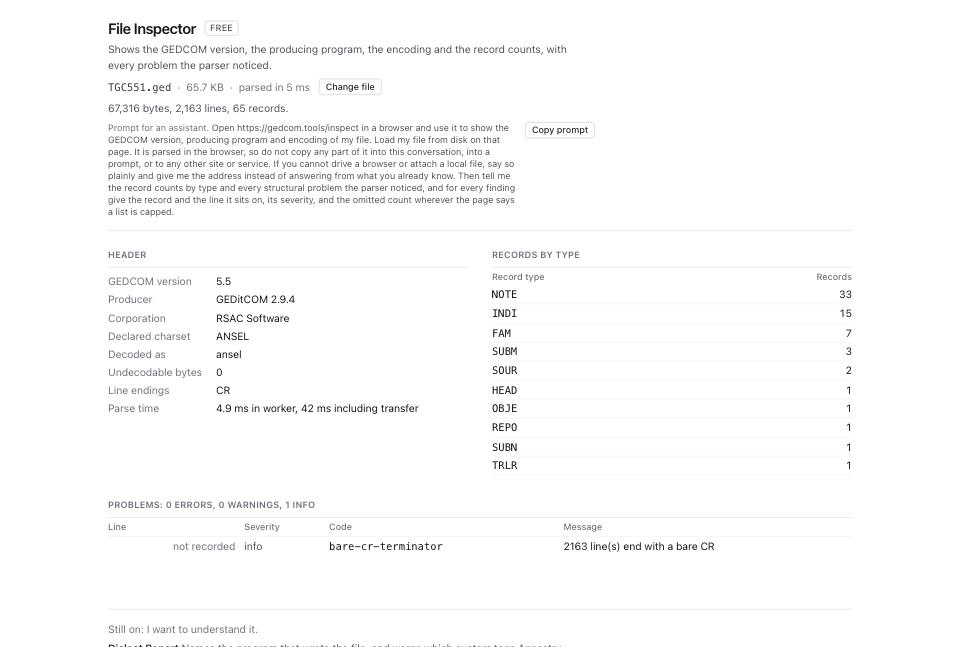
- Open Encoding Repair and drop the same file. The header line reads
156 values with non-ASCII text, no value needs a correction. 156 values keep the same text but are written with different bytes as ANSEL becomes UTF-8. - Read the verdict block. HEAD.CHAR says reads
ANSEL. Parser read it as readsANSEL. Bytes are readsANSELwith a confidence beside it. Three agreeing lines mean the file is what it claims and the repair is a straight transcode. - Open How the charset was decided (6 candidates scored). On this fixture ANSEL wins at 70% confidence, and its rationale counts
289 composing marksand1219 unusual marksagainst Windows-1252's729 accented lowercase before a capital. A high composing-mark count is the signature of ANSEL: those bytes are accents standing before their letters.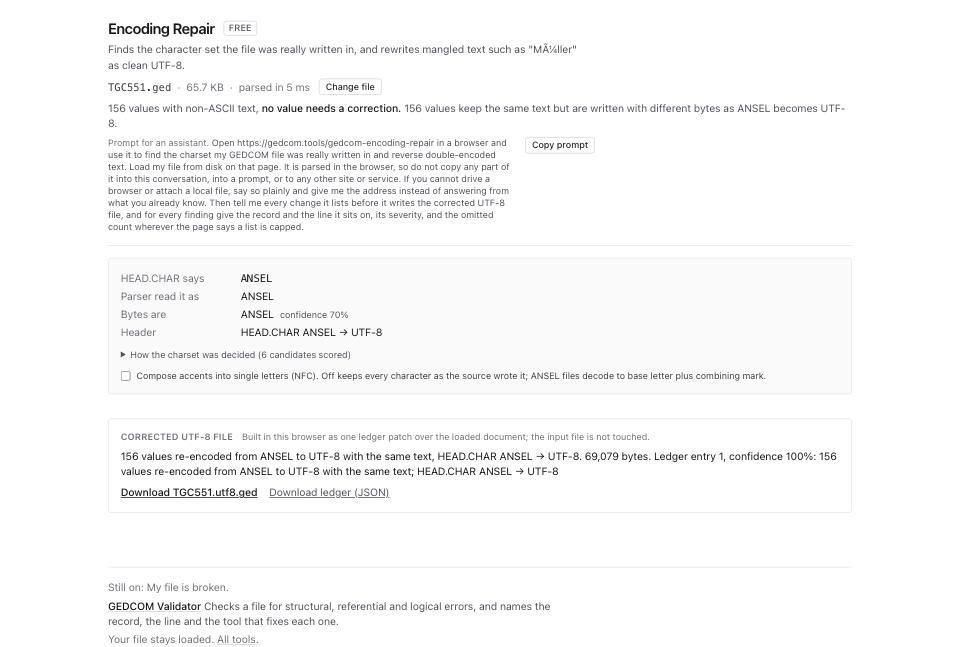
- Read Header, the last row of the verdict block. It states the header change the repair will make. On this fixture it reads
HEAD.CHAR ANSEL → UTF-8. - Decide about Compose accents into single letters (NFC). Ticked,
oplus a combining umlaut becomes the single characterö. Unticked, the two characters stay as the source wrote them. Tick it unless a downstream program needs decomposed forms; most search boxes match the composed form only. - Look for Corrections. On this fixture the section is not on the page, because nothing is mangled: the file is honest ANSEL and every value round-trips. It appears only when a value has to change, and then it lists each one with Before and After columns and a confidence.
- Read Corrected UTF-8 file. Under 5,000 corrections the file is built as you watch, so on this fixture the panel already holds the result rather than a button. It reads
156 values re-encoded from ANSEL to UTF-8 with the same text, HEAD.CHAR ANSEL → UTF-8. 69,079 bytes. Ledger entry 1, confidence 100%. On a file with thousands of corrections the panel shows Apply N changes and build file instead, and you press it. - Click the download link, named after your file. On this fixture it reads Download TGC551.utf8.ged.
- Click Download ledger (JSON) as well if you want the machine-readable record of every change.
What to check when it worked
- The repaired file's header carries
1 CHAR UTF-8. Run File Inspector on it and read the charset line. - Open the repaired file in GEDCOM Viewer and search for a name you know has an accent. It reads as one accented letter, not a letter with a mark standing beside it.
- Encoding Repair on the repaired file reports
Nothing to change: the file is UTF-8 with a matching header. - The value count matches. On this fixture 156 values held non-ASCII text before the repair and 156 carry the same text afterwards.
- No
undefined-ansel-byteproblem appears in File Inspector. That code means a byte had no ANSEL meaning and was kept as-is.
What to do when it did not
Bytes are reads Windows-1252 while the header says ANSEL. The exporting program wrote the wrong header. The verdict block then shows a Reinterpretation row, and every non-ASCII value is re-read under the charset the bytes actually are. Check a handful in the Corrections table before accepting.
Names read Müller rather than Mèuller. That is double encoding, not ANSEL: UTF-8 bytes written a second time through a single-byte table. The verdict block shows a Double encoding row and reverses it. How to fix garbled characters and accents in a GEDCOM covers that case.
Some characters became question marks in the destination program. The destination is not UTF-8 clean. Nothing in the file can fix that; the character reached it and the program could not draw it.
You are moving to GEDCOM 7.0. 7.0 removed ANSEL entirely; UTF-8 is the only charset. Repair the encoding first, then read how to convert GEDCOM 5.5.1 to 7.0, and what does not survive.
A byte has no ANSEL meaning at all. File Inspector reports undefined-ansel-byte. Those bytes are kept as private-use characters and written back unchanged, so nothing is lost, but the value they held is not recoverable from the file alone.