Read a GEDCOM without installing anything
Someone emailed you a .ged file. Open it as people, families and a pedigree in a browser tab, with nothing uploaded and nothing installed.
Beginner10 minutesChecked against the tools on 3 Sep 2026Uses GEDCOM Viewer and File Inspector
read-a-gedcom-without-installing-anything.md, 6,623 characters. The same bytes answer at /how-to/read-a-gedcom-without-installing-anything.md.
A relative sent a .ged file. Double-clicking it does nothing, or opens a text editor showing several thousand lines that start with numbers. You want to know who is in it before you decide whether to install a genealogy program.
The advice at the top of most search results is to rename the file to .txt and read it. That works and tells you almost nothing: the file is a flat list of records, and the relationships between them are pointers you would have to follow by hand.
What causes the file to look like that
A GEDCOM is one fact per line. Each line starts with a level number saying how deeply it is nested, then a tag, then a value.
0 @1@ INDI
1 NAME Max /Mustermann/
1 SEX M
1 BIRT
2 DATE 1 JAN 1980
1 FAMC @F1@
Level 0 starts a record. Level 1 lines belong to it. Level 2 lines belong to the level 1 line above them. @1@ is this person's identifier, and @F1@ is a pointer to a family record somewhere else in the file. Nothing in the text puts the family next to the person, which is why reading it as text is hard and why a program that follows the pointers makes it easy.
Two questions usually come first, and they need different tools. What is in this file at all, and who are these people.

Diagram source
flowchart TD
  F["A .ged file arrived"] --> Q{"What do you want to know?"}
  Q -- "how many people, what program made it, is it damaged" --> I["File Inspector"]
  Q -- "who these people are and how they connect" --> V["GEDCOM Viewer"]
  I --> P{"Does Problems list errors?"}
  P -- "yes" --> R["Repair before reading further"]
  P -- "no" --> V
  V --> S["Search a surname, open a person, read the pedigree"]
The steps
Numbers below are from fixtures/public/Musterstammbaum.ged, a 7,175-byte German export.
- Open File Inspector and drop the file on the drop target. The file is read by JavaScript in your browser. Nothing is uploaded, and the page makes no network call with the file in it.
- Read Header. On this fixture GEDCOM version reads
5.5.1, Producer readsAHN (Ahnenblatt) 2.99g, Declared charset readsUTF-8, Decoded as readsutf-8 with BOMand Line endings readsLF. The producer line tells you which program wrote it, which decides what its non-standard tags mean. - Read Records by type. On this fixture
INDI 20,FAM 11, thenHEAD,SUBMandTRLRat 1 each. TheINDIcount is the size of the tree in one number. - Read Problems. On this fixture the title reads
Problems: 0 errors, 0 warnings, 0 infoand the line below says the parser found nothing structurally wrong. Rows here mean the file needs repair before it is worth reading; GEDCOM error messages, decoded maps each code to its fix.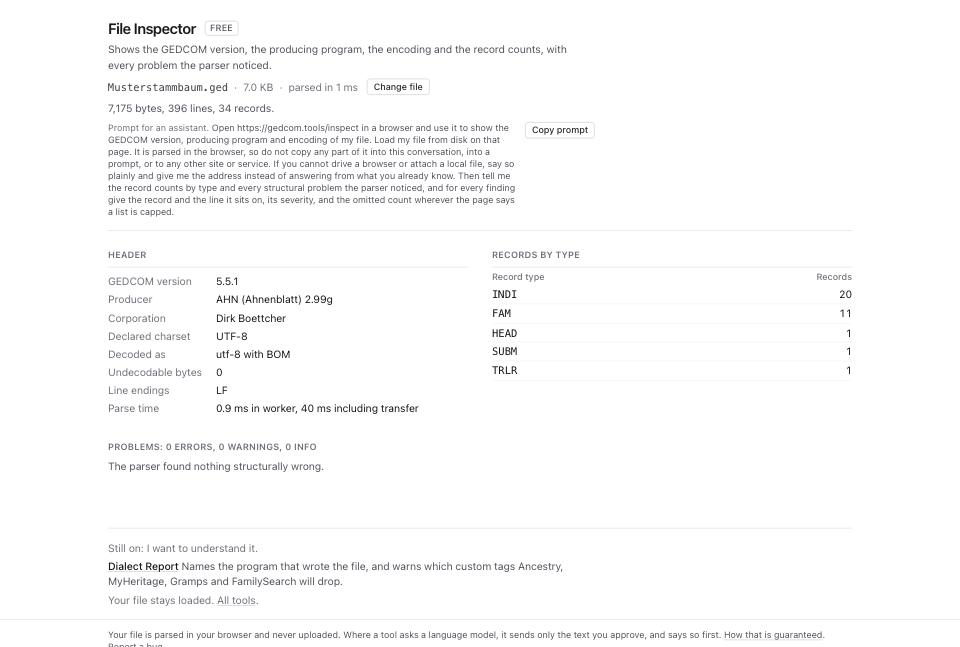
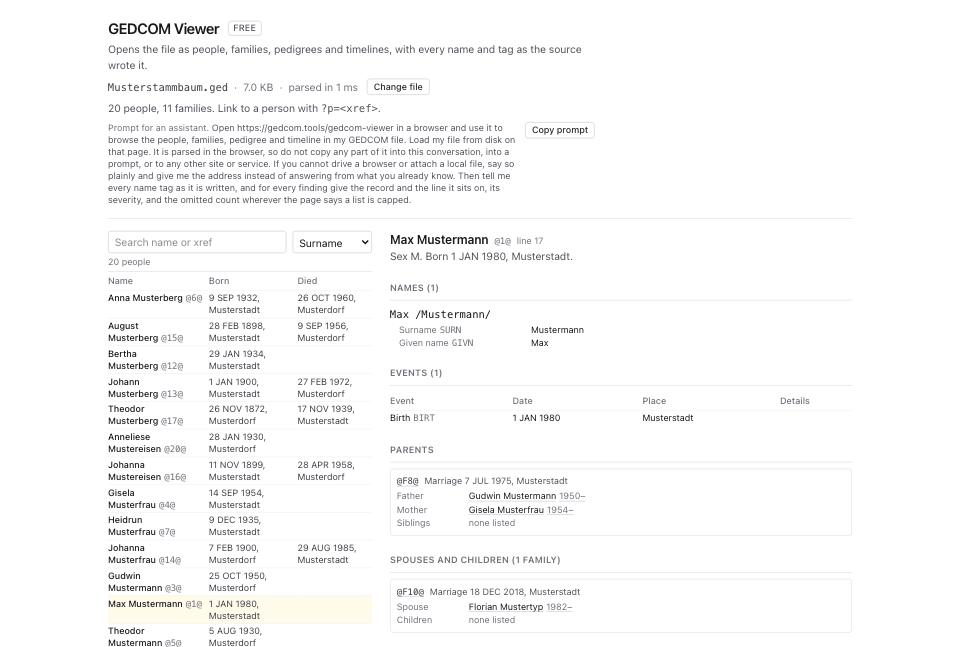
- Open GEDCOM Viewer and drop the same file. The header line reads
20 people, 11 families. - The left column is the people list. Use Search name or xref to filter it, and the Sort people select to order by Surname, Given name, Birth, Death or Xref.
- Click a row. The right panel fills with that person: their name as the file wrote it, their events with dates and places, and their family links.
- Read Parents and Spouses and children in the person panel. Each name there is a link; clicking one moves to that person.
- Scroll to Pedigree. Set Generations up to 4 to see great-great-grandparents. Every box in the chart is clickable.
- Read Timeline below it. It lists every dated event for that person with their age at each one.
- Copy the address bar if you want to come back to the same person. The viewer writes the selection into the URL as
?p=@1@.
What to check when it worked
- Records by type in File Inspector shows an
INDIcount close to what the sender described. A count of 0 or of 20 on a tree they called large means the file was cut. - The Problems table is empty, or every row is severity
info. - The viewer's header line matches the Inspector's
INDIandFAMcounts. On this fixture both say 20 and 11. - Names show their accents.
Müllerreading asMülleris a charset fault, not a damaged file, and how to fix garbled characters and accents covers it. - A person you know appears with the right parents when you click through.
What to do when it did not
The page says nothing loaded. The file may not be a GEDCOM. Open it in a text editor: the first line of a GEDCOM is 0 HEAD. A .ged file whose first line is anything else came from somewhere unusual.
The viewer lists people with no name. The NAME lines are absent or malformed. Run GEDCOM Validator and read the structural category.
Clicking a person shows no parents when you know they have some. The pointer runs one way: the person names the family and the family does not name them back. How to find every broken pointer in a GEDCOM finds all of those.
You want the data as a spreadsheet. Nothing here exports one yet. The viewer is for reading.
The file is large and the page takes a while. Parsing runs in a worker so the page stays usable. The Inspector prints the parse time beside the file size.