What is a GEDCOM file
A plain text file, one fact per line, that every genealogy program can read and none reads the same way. What the format is and where it loses data.
Beginner10 minutesChecked against the tools on 3 Sep 2026Uses File Inspector and GEDCOM Validator
what-is-a-gedcom-file.md, 7,635 characters. The same bytes answer at /how-to/what-is-a-gedcom-file.md.
A GEDCOM file is how one genealogy program hands a family tree to another. It ends in .ged, it is plain text, and every program that touches family history can read it.
This page is written because the file arrives and nobody explains it. The definitional answer is well covered: FamilySearch's wiki, gedcom.io and the specification itself all describe the format, and none of them is wrong. What follows is the same description with the part those pages leave out, which is where the format loses your work.
What is in one
Six lines from a real export:
0 @1@ INDI
1 NAME Max /Mustermann/
1 SEX M
1 BIRT
2 DATE 1 JAN 1980
1 FAMC @F1@
Every line has three parts.
The level is the first number. 0 starts a new record. A line at level 1 belongs to the record above it, and a line at level 2 belongs to the level 1 line above it. That is the whole nesting rule.
The tag is the word after the level. INDI is an individual, FAM a family, NAME a name, BIRT a birth, DATE a date, SOUR a source. Tags are three or four letters, defined by the specification, and a tag starting with an underscore is one a program invented.
The value is the rest of the line. In NAME Max /Mustermann/ the slashes mark the surname, which is how the format tells a family name from a given name in a culture-neutral way.
@1@ is an identifier, called an xref. @F1@ on the last line is a pointer to a family record elsewhere in the file. Relationships in a GEDCOM are pointers between records, not nesting, and a pointer to a record that does not exist is the single commonest fatal error in the format.
A file is a header, then records, then a trailer:
0 HEAD
1 SOUR AHN
1 GEDC
2 VERS 5.5.1
1 CHAR UTF-8
0 @1@ INDI
...
0 TRLR
The header states which program wrote the file, which version of the specification it follows and which character set the bytes are in. Those three lines decide how everything after them is read.
What causes the losses
Three versions are in use, and they are not the same format.
5.5 dates from 1996 and mandates ANSEL, a 1985 library character set. 5.5.1 dates from 1999, is the version most programs export, and permits UTF-8. 7.0 arrived in 2021, drops ANSEL entirely, changes how long text is continued across lines, and adds a schema mechanism for extension tags. A 5.5.1 file and a 7.0 file both end in .ged and are not interchangeable.
Then every program adds its own tags. _APID is Ancestry's link from a citation to a record image. _UID is a per-record identifier, written four different ways by four programs. None of these is in the specification, so an importer meeting one may map it, keep it as text, or drop it silently.
The result is the thing nobody says out loud: the file transfers people reliably and transfers everything attached to those people unreliably. Sources, notes, media links and custom events are the parts that go missing, and the destination usually says nothing.

Diagram source
flowchart TD
  P["Your genealogy program"] --> E["Export as GEDCOM"]
  E --> H["Header: version, producer, charset"]
  E --> R["Records: INDI, FAM, SOUR, NOTE, OBJE"]
  E --> X["Extension tags: _APID, _UID, and the rest"]
  H --> I["Another program imports it"]
  R --> I
  X --> D{"Does the importer know this tag?"}
  D -- "yes" --> I
  D -- "no" --> L["Dropped, or kept as text. Usually with no message"]
The steps
Numbers below are from fixtures/public/Musterstammbaum.ged.
- Open File Inspector and drop your file. It parses in your browser; the file does not leave your machine.
- Read Header. On this fixture GEDCOM version reads
5.5.1, Producer readsAHN (Ahnenblatt) 2.99g, Declared charset readsUTF-8, Decoded as readsutf-8 with BOMand Line endings readsLF. Those facts determine how everything after the header is read. - Read Records by type. On this fixture
INDI 20,FAM 11, andHEAD,SUBMandTRLRat 1 each. Individuals and families are the two record types every tree has.SOUR,NOTE,OBJEandREPOappear when the tree carries citations, notes, media or archives. - Read Problems. On this fixture the title reads
Problems: 0 errors, 0 warnings, 0 info. Any row here is a fault in how the file is written rather than in what it says.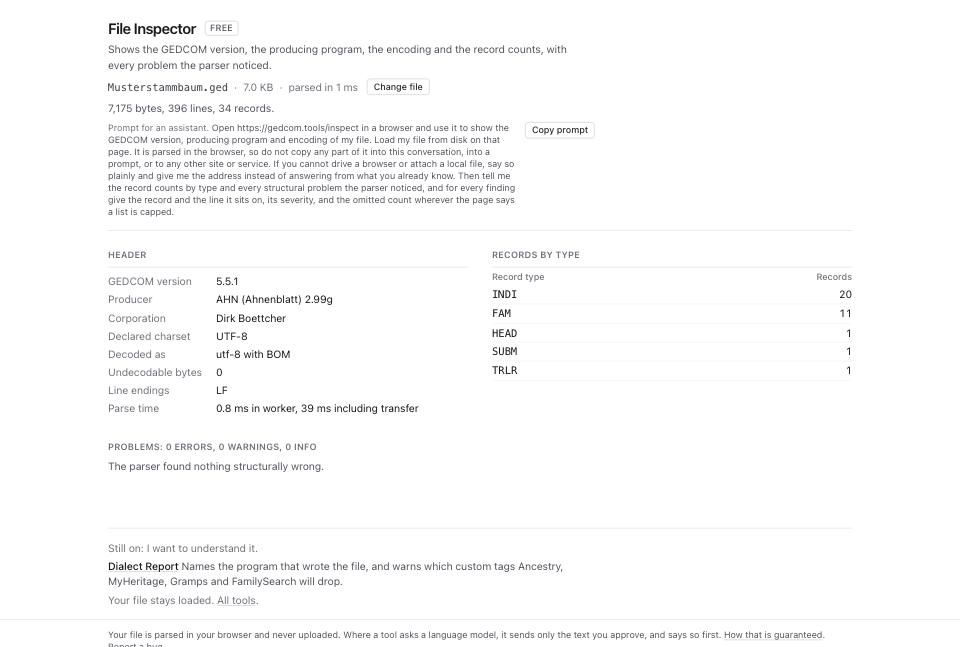
- Open GEDCOM Validator and drop the same file. The header line states how many rules ran and what was checked: records, individuals, families, pointers, dates and facts.
- Read the category table.
structuralis whether the file is written correctly.referentialis whether the pointers resolve.logicalis whether the content can be true.encodingis whether the bytes match the declared charset. - Read the three severity counts. An
errorblocks an import. Awarningis a fact worth checking. Aninfois a note about the file, such as a header with noSUBMpointer.
What to check when it worked
- Header names a GEDCOM version.
unknownmeans the header is missing or damaged. - The
INDIcount matches the size of the tree you exported. - Problems in File Inspector is empty, or holds only
inforows. - GEDCOM Validator reports 0 errors under
structuraland 0 underreferential. Those two decide whether another program can read the file at all. - The producer line names the program you exported from. Something else means the file passed through another program on the way.
What to do when it did not
The version reads unknown. The header has no GEDC and VERS pair. Every version-specific rule is then a guess. GEDCOM error messages, decoded covers a damaged header.
The counts are far below what you exported. The file was cut, or the parse stopped at a bad line. Read the Problems table for a line number.
You want to know what a specific site will drop. The version and the producer decide that. Which of your custom tags each site will delete runs a per-destination table over your own file.
Your file is 7.0 and you want a conformance check. The specification authors publish a browser-local checker at gedcom7code.github.io/js-gedcom, which is the reference implementation for that version.
You want to open it and read it, not audit it. Read a GEDCOM without installing anything is the shorter path.